
Getting Started With Content Blocks: Hero Image Selectable from a List of Options
When to use — When the image shown in the message depends on a user's selection from a series of options. For example, the image changes depending on the chosen season. You can use this type of Content Block when you want to give limited freedom to the user and select from a series of predefined options.
What to use — This solution requires several elements to be included in the Content Block:
-
A TEXT variable with multiple options to choose from. In this example (plantopia-3c-hero-selectable), an enumerated choice of images is presented using a variable, so in the message the marketer simply selects an option from the presented choices:
<!-- +++++++++++++++++++++ Selectable Hero Images here +++++++++++++++++++++++++++++++  -->

<sg:var type="text" name="Seasonal_Hero_Image" value="spring-1">
    <sg:option value="spring-1">Spring</sg:option>
    <sg:option value="summer-1">Summer</sg:option>
    <sg:option value="autumn-1">Autumn</sg:option>
    <sg:option value="winter-1">Winter</sg:option>
</sg:var>
-
Use this variable in the source of the image. As the image should not be editable in the Content Block properties in the message, a normal <img< tag can be used
<img id="hero-image" href="https://en.wikipedia.org/wiki/Plant" style="max-width:100%;display:block;width:600px" width="600" class="full" border="0" alt="Summer Image" src="https://classroom1.slgnt.eu/images/shared/cb/[%[VARIABLE.Seasonal_Hero_Image]%].png?no-cache=1" />
When this Content Block is used in the message, the user is presented with a list of options:
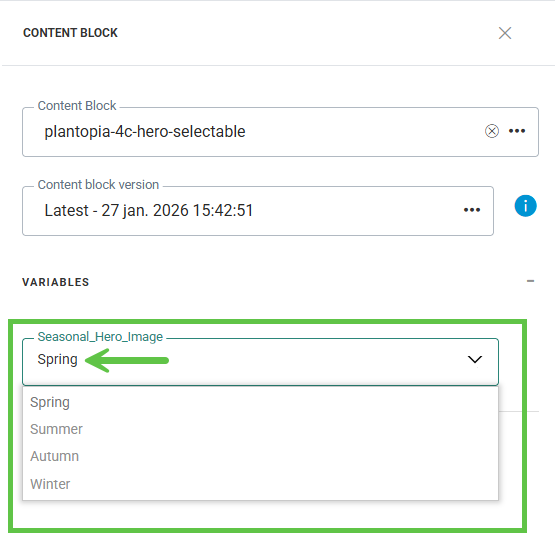
When selecting the option from the drop-down of values, the source of the image is changed dynamically and the corresponding image is shown. For example, choosing Spring from the drop-down will show the Spring image.
