
New features in Selligent by Zeta
Test Groups
WILL BE ROLLED OUT IN THE COMING WEEKS
BACKGROUND:
The Test Groups feature announced in the previous release, enables users to thoroughly test their messages both in advance and at the time of sending by including Seed Groups in the target audience. We are continuously enhancing this feature to improve its functionality and overall user experience.
SOLUTION:
Additional information is now provided to the user when sending test emails to the Test Group
What this looks like in the solution:
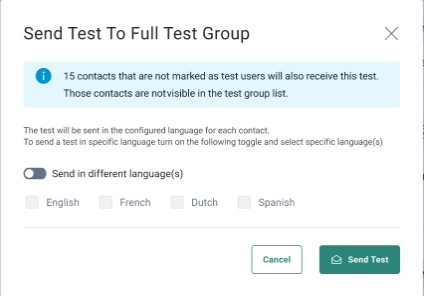
When users choose to send a test email to the Content Test Group without enabling the “Show full audience” option, only the test users in that group are visible — real contacts are hidden from the overview.
However, selecting to send the test message to the full Content Test Group will still include the real contacts, even if they aren't displayed.
To ensure clarity, users are shown the number of real contacts in the group before sending, so they have a complete understanding of how many recipients will receive the message.
Accessibility act and Selligent
AVAILABLE TO ALL USERS
BACKGROUND:
Creating accessible content ensures that everyone, regardless of ability, can access, understand, and interact with your message. People use digital content in different ways: some rely on screen readers, others navigate with keyboards, voice commands, or assistive tools. When content is designed with accessibility in mind, it opens the door to more inclusive, equitable experiences for all users.
SOLUTION:
To ensure that all recipients have a positive experience with our communications, we have added an additional information when designing a message.
What this looks like in the solution:
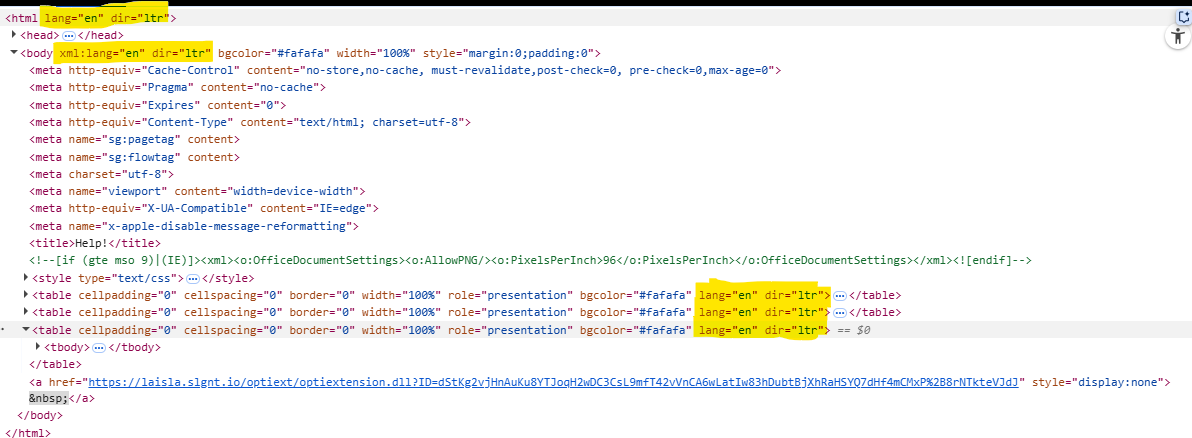
Based on the language of the message, upon Publish, a lang and dir attribute is automatically added to the HTML tag in your messages as well as to the body. The dir attribute indicates the direction in which the text needs to be read, ltr or rtl. This is important because these tags are used by browser AI translations.
Corrections
- Reporting - The correct date is now shown when grouping by in the overview tab
- The journey duplication dialog now correctly shows the journey type (EXECUTION_DIALOG_DUPLICATION_JOURNEY)
- The Content Blocks overview correctly displays Items belonging to the opened folder
- Clicking on a Content Block link loads the Content Block, as expected
- Admin configuration - Save of regex password policy no longer returns an incorrect warning that a Field is required whereas it has been saved with a value
- It is again possible to schedule the 4th or 5th weekday in a Recurring Batch Journey with monthly scheduling. Oddly, this was broken before
- When using the medium Azureblob the connectionstring is present again in backend. This was missing previously
