
Email Campaign: Analytics
The Analytics tab provides the following reports.
Engagement Report
The Engagement dashboard provides marketers with insights on how well their campaign is doing and if it is creating engagement. Are your emails reaching the intended audience, are customers opening your emails and are they engaged with your content, are they clicking through?
 read more
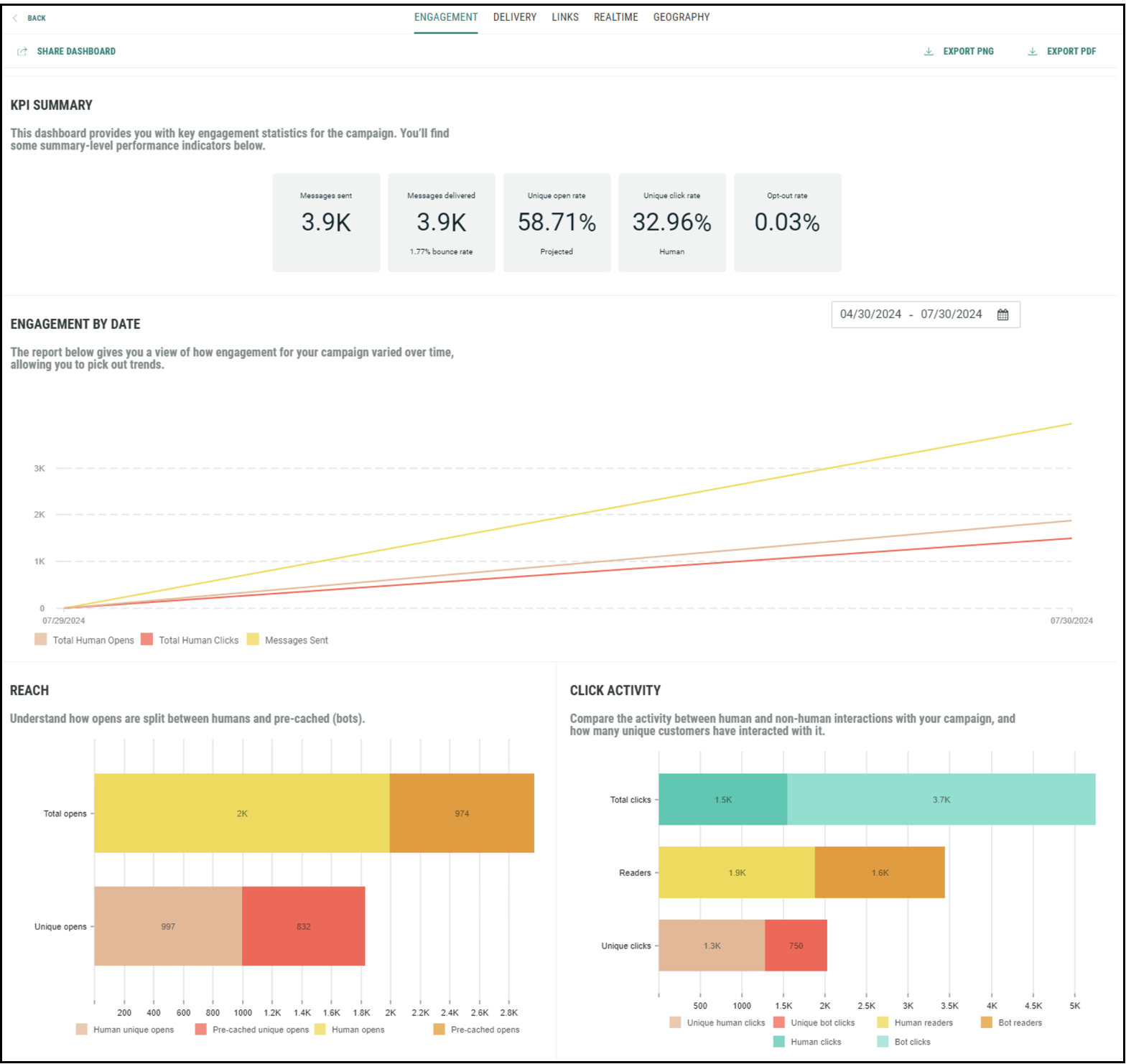
The KPI Summary dashboard provides general KPI for the selected campaign, such as:
-
Messages sent — how many messages were sent out
-
Messages delivered — how many of the messages sent, have actually been delivered.
-
Projected percentage of messages opened — how many of the delivered messages have been opened. This is the unique human open rate as a percentage of recipients whose opens or non-opens would be visible. This means recipients using Apple MPP are excluded from the open rate.
-
Percentage of messages clicked — how many of the delivered messages have been clicked by unique humans. Non-human clicks are not included.
-
Percentage of opt-outs — how many of the delivered messages resulted in an opt-out
The Engagement dashboard also provides performance information over time, splitting up human and non-human clicks. The time line is based on the selected filter.
The Reach report is a comparison between total opens vs unique opens, as well as human vs pre-cached opens. A pre-cached open is a false open by Apple MPP.
The Click Activity report compares human and non-human interactions (clicks) as well as unique vs total clicks.
Delivery Report
The Delivery dashboard gives marketers insights if their messages are reaching the inbox and how many don't get delivered because of spam complaints, optouts or other bounce reasons (such as bad email addresses).
read more
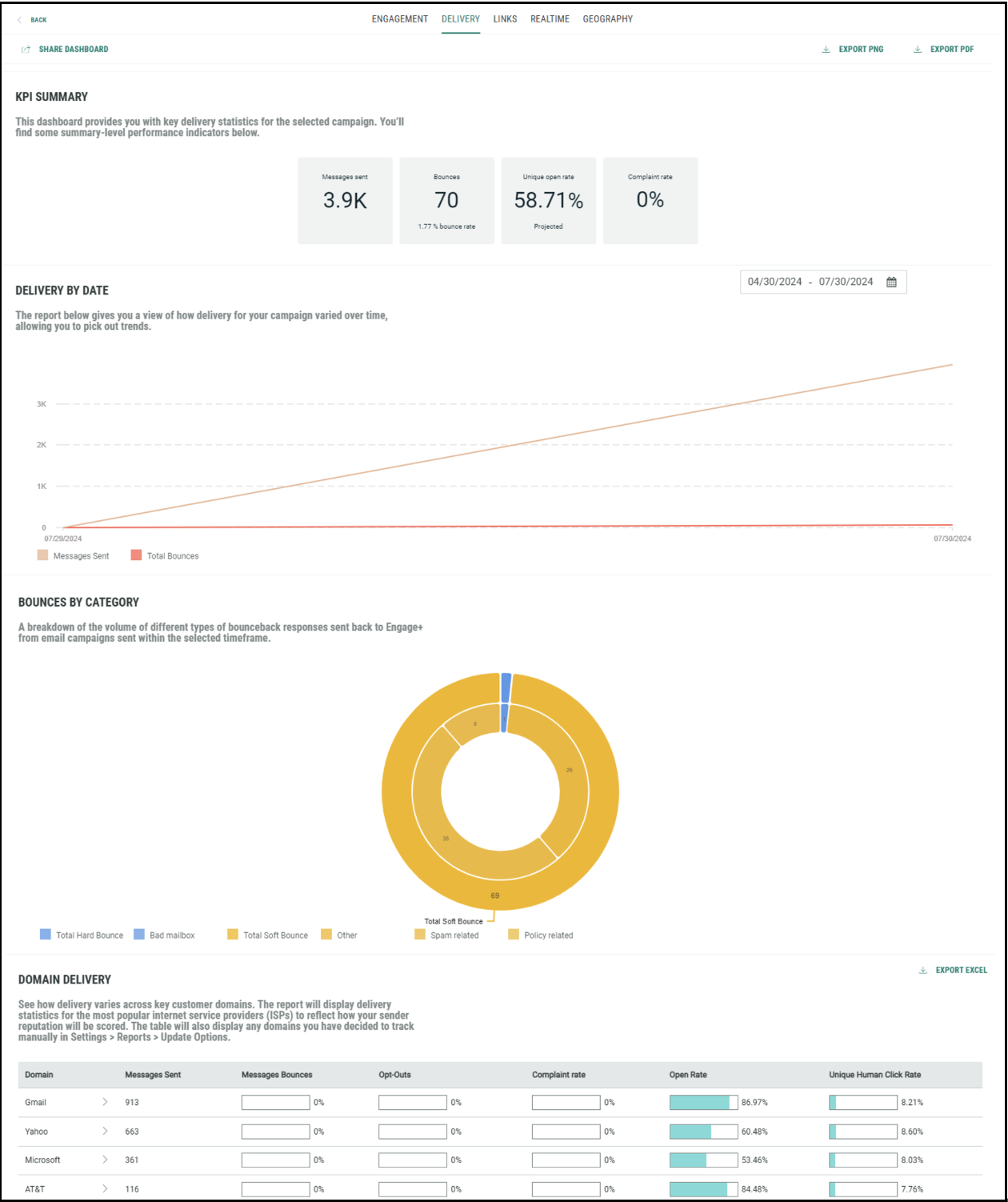
The KPI Summary dashboard shows key delivery statistics for the selected campaign in the selected time period. It includes:
-
Number of messages sent.
-
Percentage of messages that bounced.
-
Percentage of projected opens. This is the unique human open rate as a percentage of recipients whose opens or non-opens would be visible. This means recipients using Apple MPP are excluded from the projected open rate.
-
Percentage of messages that generated a complaint by the recipient.
In addition, in the Performance Summary By Sent Date report, you can consult delivery details over the selected time period, and easily follow the evolution of bounce rates, opt-out rates and complaint rates.
Next, the Domain Delivery report shows delivery numbers for individual ISPs. This allows comparing delivery numbers for key customer domains.
Also, it is good to know what the main reasons are for bounced emails. A dedicated graph Bounces By Category splits up the bounce information per type of bounce (bad domain, inactive mailbox, spam related, routing errors, etc.).
Links Report
The Links dashboard focuses on human and non-human click interaction, providing totals for the selected time period as well as an evolution over time. For marketers, it is important to know how much interest is generated through their emails. They can obtain this information by looking at click interactions but filtering out the non-human interactions. Also, insights on how these interactions evolve over time can provide valuable information for future campaign planning.
read more
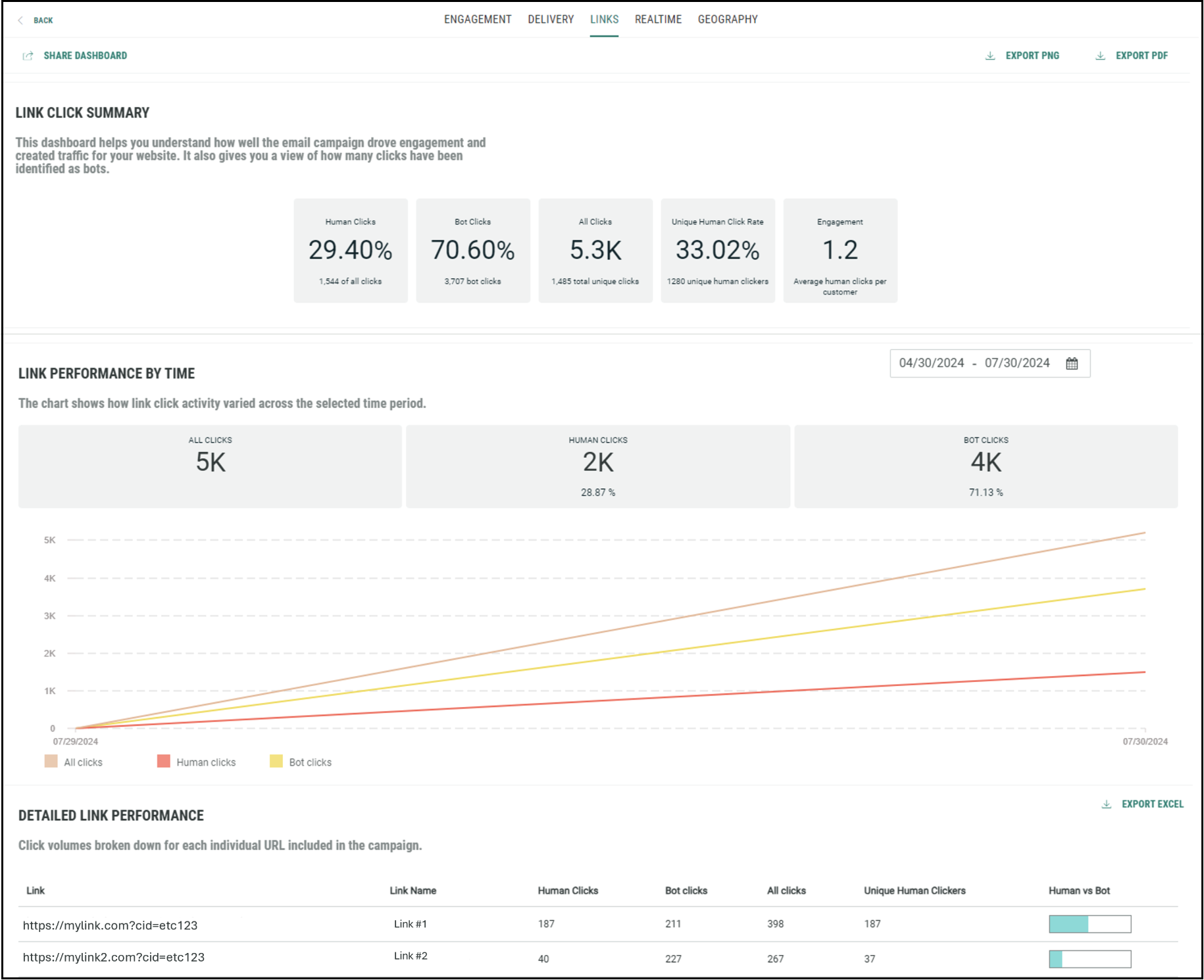
The Link Click Summary report provides insights on how much engagement and traffic your campaigns are generating over the selected time period. Following KPI are provided:
-
Percentage of human clicks
-
Percentage of bot clicks
-
Total number of clicks, including human and bot clicks
-
Percentage of unique human clicks
-
Average number of human clicks per customer
The Link Performance By Time of Click is a time line of click activity, showing how click activity varies over the selected time period. Human clicks, bot clicks as well as the total number of clicks are included.
If you are interested in click behavior for individual links, the table view Detailed Link Performance By Send Date is provided, showing per individual link the number of human clicks, non-human clicks, total clicks, unique clicks, as well as the human vs bot ratio.
Realtime Report
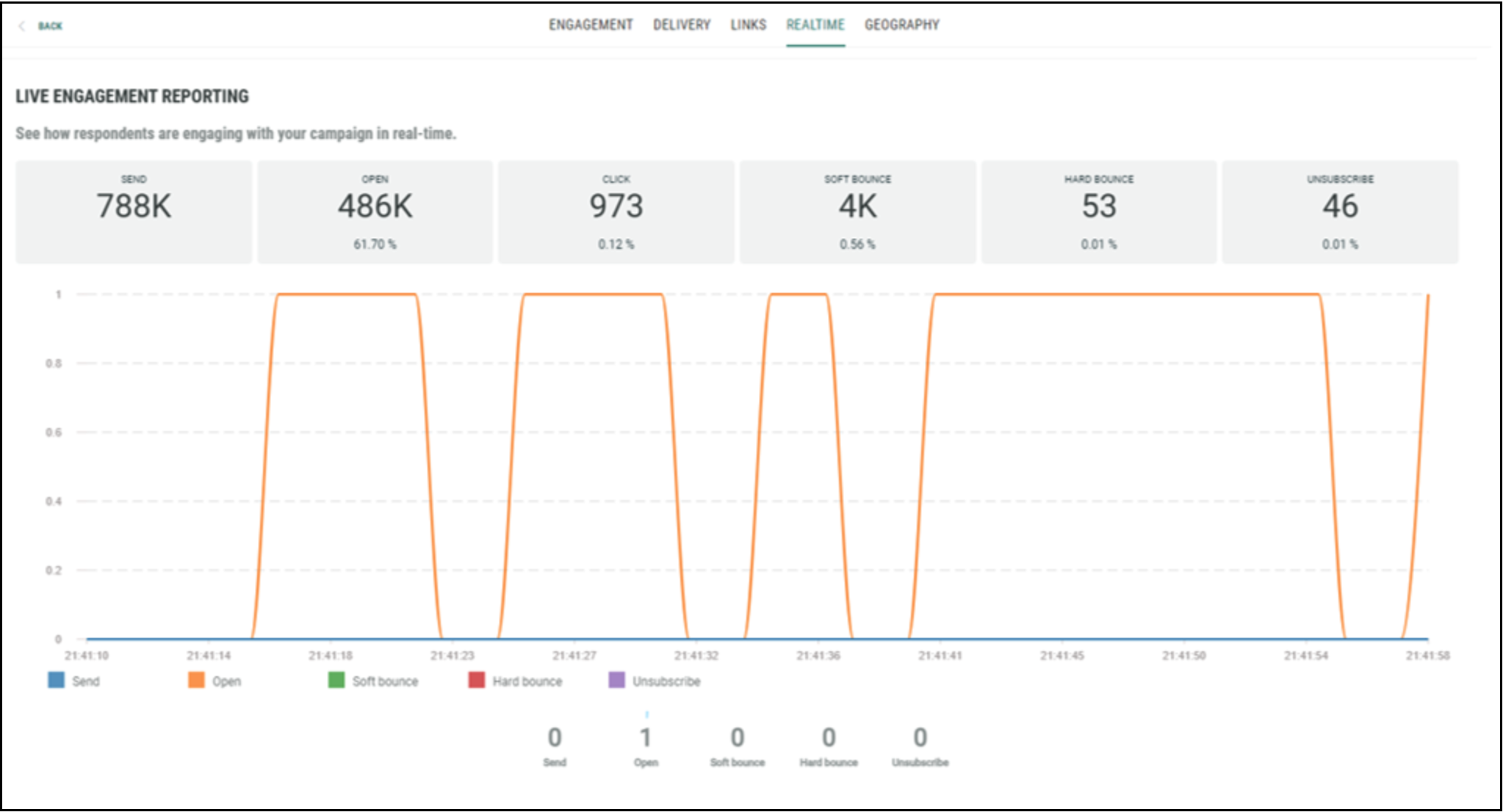
This dashboard provides live engagement reporting (emails sent, opened, clicked, hard and soft bounced, unsubscribed) and show how respondents are engaging with your campaign in real time. The graph shows live information within a time frame of less than a minute.
Geography Report
Is your campaign doing well in one region and not in another. Should you change your approach for specific regions where engagement is low compared to others? The Geography dashboard allows you to compare engagement over the different countries.
read more
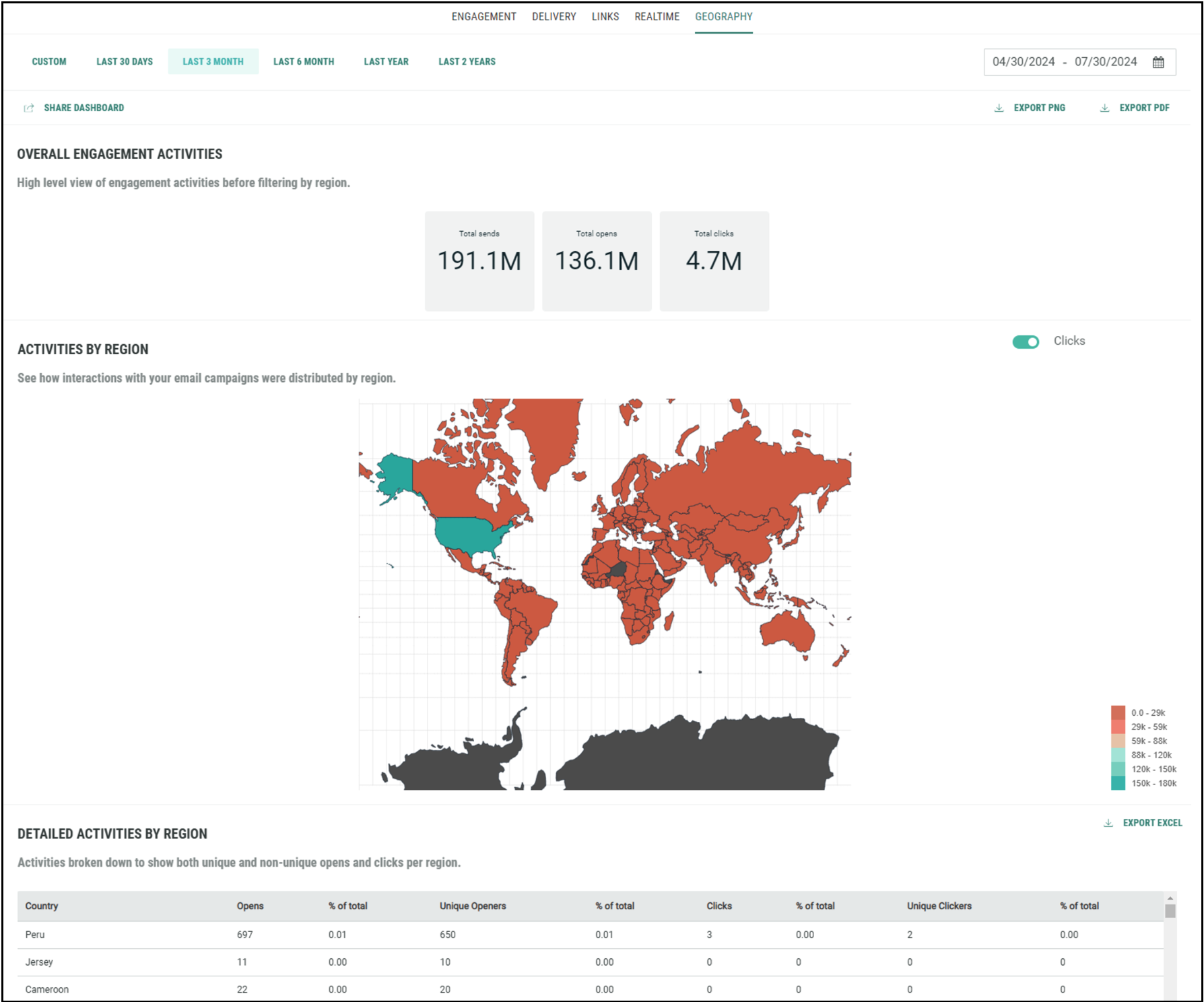
Overall Engagement Activities is a high level view of key performance indicators across all regions. It includes total sends, total opens and total clicks.
Activities per region shows a color-coded map with the distribution of engagement statistics over the different regions. This provides quick insights on what regions are performing better than others.
The table Detailed Activities By Region provides key performance indicators split up per region. You can drill down within the United States to see the numbers for the individual states within the US.
