Campaign Summary Dashboard
Overview
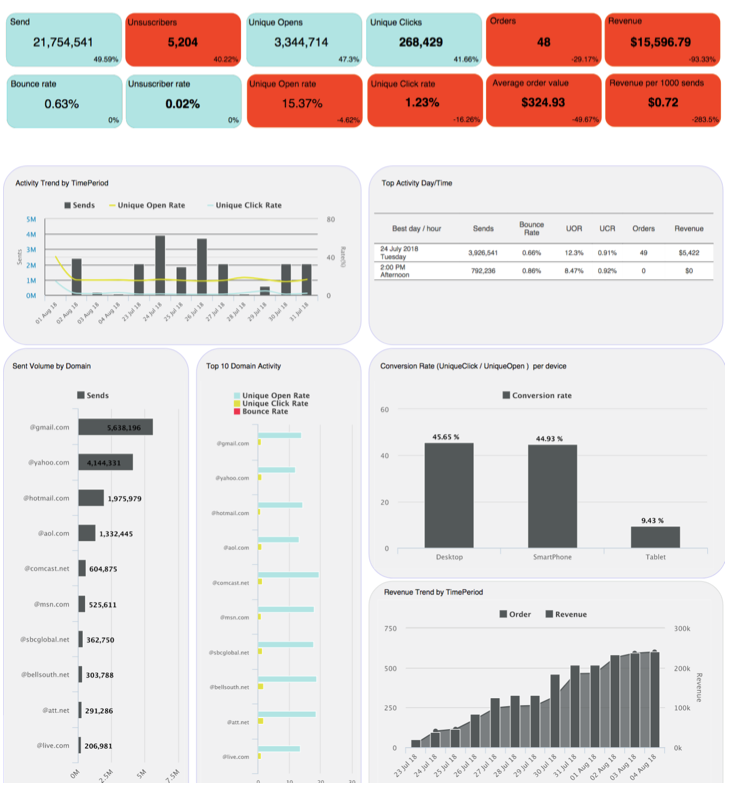
The Campaign Summary Dashboard provides a holistic summary of all Campaign metrics sent within the selected date range, and also allows you to compare performance with any previous date range. The metrics along the top of the report are color-coded to indicate whether a particular metric increased (blue) or decreased (red) between the two date ranges being compared. Each metric also indicates the percentage of change between the two date ranges being compared.
Other sub-reports within the Campaign Summary Dashboard include the following:
-
Activity Trend by selected aggregation type for Sends, Unique Open Rate, and Unique Click Rate
-
Top Activity Day/Time with Key Performance Indicators.
-
Send volume by Domain
-
Domain performance, showing the top ten domains by Unique Open Rate, Unique Click Rate, and Bounce Rate
-
Device usage activity, showing Conversion Rate (Unique Click / Unique Open ) per device type (see below for more details on Device Type definitions)
-
Cumulative Revenue and Orders Trend by selected aggregation type parameter
Display Options
To change the reporting parameters, click the Options button in the tool bar to display the available parameters. Enter or select the desired parameters:
-
Start / End Date: Enter the Start and End Date for the desired reporting range. The default settings are to show data from the past seven days.
-
Aggregation Type: Select the desired Aggregation Type -- None, Daily, Weekly, Monthly. The default setting is Daily.
-
Campaign Type: Filter by the desired Campaign Type -- All, Regular, Date Triggered, Event Triggered, or Instant Triggered . The default setting is All.
-
Comparison Start / End Date: Enter the Start and End Date for the date range to which you want to compare. The default settings are to compare to the previous week.
When finished, click apply to refresh the report with the new settings. To revert back to the default settings, click reset.
Device Type Definition
The platform uses the following definitions for the Device Type:
-
Smartphone: Indicates that device can make and receive phone calls, has a screen size greater than or equal to 2.5 inches and less than 7 inches, runs a modern operating system, and is not designed to be a wearable technology.
-
Desktop: Indicates that the device is a desktop PC.
-
Tablet: Indicates that the device is primarily advertised as a "tablet," or that the device is primarily advertised as a "phablet" and has a screen size equal to or greater than 7 inches.
-
Small Screen: Indicates that the device is a mobile device, with a screen size less than 2.5 inches.
-
Mobile: Indicates that the device's primary data connection is wireless, and the device is designed to operate mostly by battery power (e.g. mobile phone, smartphone or tablet). Laptops are not classified as mobile devices.
-
E-Reader: Indicates that the device is primarily advertised as an "e-reader" (the device is not classified as a "tablet').
-
Console: Indicates that the device is primarily a game console, such as an Xbox or Playstation.
-
Media Hub: Indicates that the device is a media hub or set top box that requires an external display.
-
TV: Indicates that the device is a TV running on a smart operating system.