Deliverability Dashboard
Overview
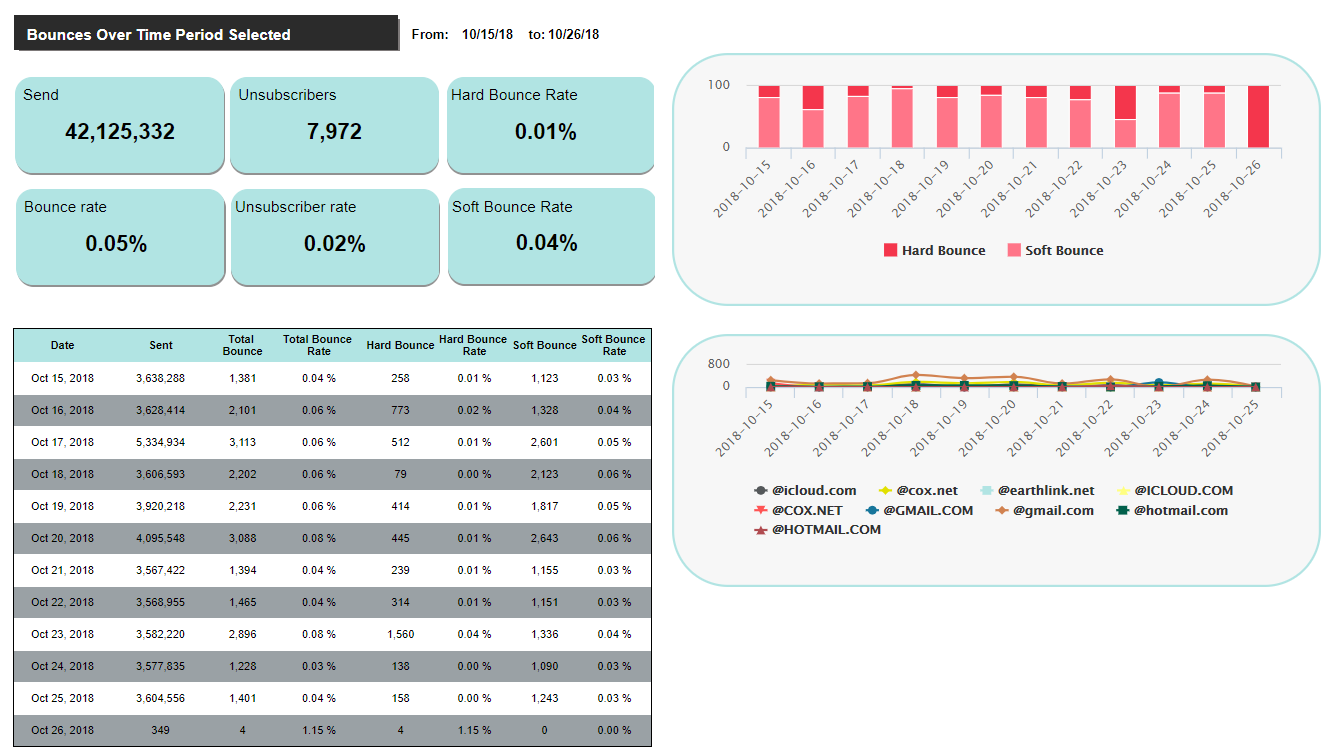
The Deliverability Dashboard shows all Key Performance Indicators related to Hard and Soft Bounces. The Deliverability Dashboard comprises the following sub-reports:
-
Chart showing Hard and Soft Bounces per day, for the selected reporting range.
-
Table listing Sent and Bounce metrics.
-
Chart showing Bounces for the top sending domains, for the selected reporting range.
Display Options
To change the reporting parameters, click the Options pane to expand it. Enter or select the desired parameters:
-
Start / End Date: Enter the Start and End Date for the desired reporting range. The default settings are to show data from the past seven days.
-
Campaign Type: Filter by the desired Campaign Type -- All, Regular, Date Triggered, Event Triggered, or Instant Triggered . The default setting is All.
-
Campaign Name: This menu is populated with all Campaigns that launched within the reporting range selected above. You can also search for a Campaign by typing in the desired search string. Select a specific Campaign, or "All." The default setting is All.
When finished, click apply to refresh the report with the new settings. To revert back to the default settings, click reset.