
Campaign Report Description -- Mobile Responses
Access
The Mobile Responses report is available by selecting Mobile Responses from the Campaign Report navigation menu.
Description
The Mobile Responses Report provides additional detail on the quantity and timing of Keyword responses that occurred as a result of the Campaign. Keywords are organized into SMS Keyword Groups, which are then assigned to Campaigns. When a recipient texts one of these keywords to your Short Code, the system tracks that response, and attributes it to the Campaign.
By Time
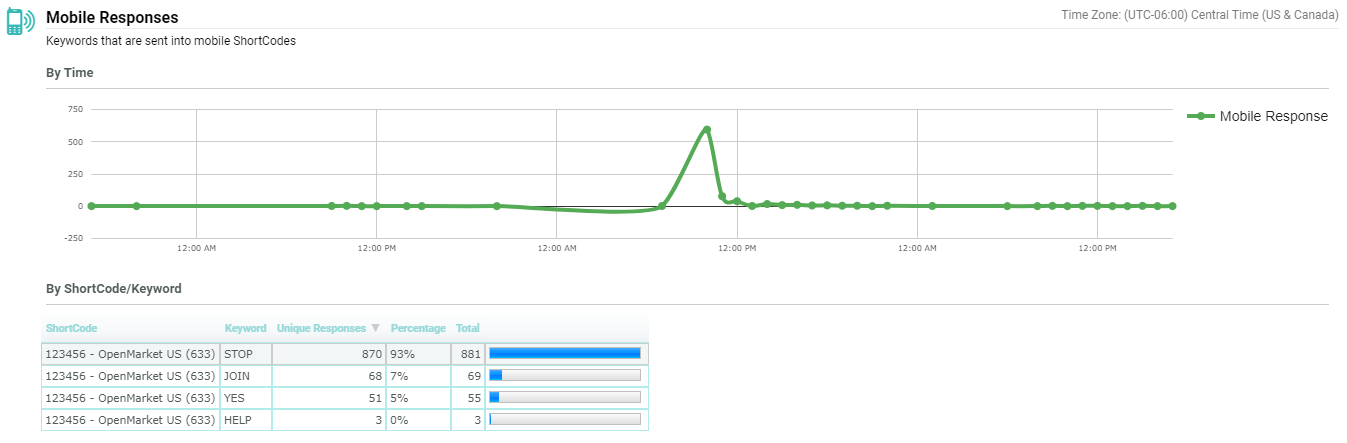
The By Time section depicts all Mobile Responses recorded from this Campaign over time. If you hover your mouse cursor over a data point on the timeline, a tooltip is displayed that provides additional detail (date / time, and the number of responses).
By Short Code / Keyword
The By Short Code / Keyword section breaks down the Campaign Mobile Responses activity into further detail, by listing each Keyword recorded for the Campaign. For each Keyword, this section shows the Keyword, the number of unique recipients who sent this Keyword response as a result of the Campaign, the percentage of the Messages Sent that this number represents, and the total number of responses.
A bar graph is displayed next to each of these Keywords. These bar graphs are proportional to each other, and are intended to provide a quick, visual way of comparing Keyword response activity. The Keyword with the highest number of responses will have a "full" bar.
By default, the list of Keywords is sorted by Unique Responses in descending order. To sort by a different column, click on the title for the desired column. The list is refreshed to sort by that column in ascending order. Click the same column a second time to toggle the sort order to descending.

