
Campaign Report Description -- Reach
Access
The Reach report is available by selecting Reach from the Campaign Report navigation menu.
Description
The Reach report provides information on how your messages are viewed by their original recipients, and if the messages are then read by the recipients' friends via social media shares and likes. The report compares email opens, social media shares, and Facebook likes. The report also provides a detailed breakdown of how recipients viewed the email -- either as an email message, on a mobile browser, as a web page, etc.
Summary
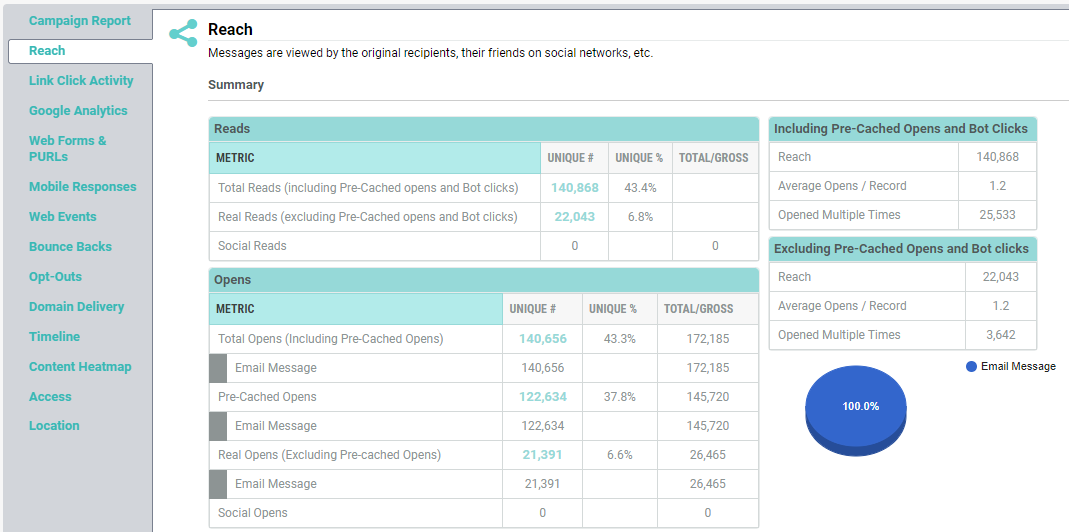
The Summary section provides high-level counts related to the number and type of activity generated by the Campaign. The metrics listed in this section are:
-
Reads: The number of unique readers from the Campaign, the percentage representation of this number with respect to the Messages Sent, and the total number of reads. A "Read" is defined as someone who either: received the plain text version of your message, and clicked on a link, or someone who received the HTML version of your message, and opened it in their email client. This section shows counts for the original recipient of the message (Total Reads count includes messages opened by proxy server and bot clicks, and the Real Reads count excludes messages opened by proxy server and bot clicks), and for any people they shared the message with via social media (Social Reads).
-
Opens: The number of unique email open activities atleast once as a result of the campaign, the percentage representation of this number with respect to the Messages Sent, and the total number of open activities. This section includes counts for the original recipient of the message, and for any people they shared the message with via social media. In addition, this section breaks down the opens into further detail, showing how the recipient viewed the email (as a web page, on a mobile browser, on an iPhone, etc.); these counts are also depicted in a pie graph to the right of the "Opens" section. These counts are individually shown for the 3 categories: Total Opens which include opens by proxy server and humans, the Pre-cached opens by the proxy server, and the Real Opens by humans only and do not include opens by the proxy server.
-
Facebook Likes: The number of unique recipients who clicked on a Facebook Like button, the percentage of the Messages Sent that this number represents, and the total number of Facebook Like button clicks. This section includes counts for the original recipient of the message, and for any people they shared the message with via social media.
-
Shares: The number of unique recipients who clicked on a Share-to-Social link, the percentage of the Messages Sent that this number represents, and the total number of shares. This section includes counts for the original recipient of the message, and for any people they shared the message with via social media.
-
Reach:The metric takes the number of unique users and adds the number of friends, and friends of friends, that may also read the Campaign via social networks.
-
Average Opens / Record: The average number of times a recipient opened an email message.
-
Opened Multiple Times: The total number of recipients of a Campaign that opened an email at least two or more times.
The Reach, Average Opens/ Record and Opened Multiple Times metrics including and excluding the proxy server opens and bot clicks are given in separate tables.
The above counts represent a segment of the Campaign's total audience. Some of these segments can easily be turned into Filters and Export Templates. If you click on the desired count, the system displays a pop-up menu with two options: Create Filter and Create Export.
For example, let's say you want to create a Filter out of the Shares segment of your Campaign audience. If you click on the Shares count, then select the Create Filter option, the system will create a Filter with a rule consisting of the Filter Activity Share to Social, with this Campaign as the Activity criteria.

