
Standard Data Load
The Standard Data Load endpoint provides the same functionality as the HTTP POST endpoint, except the Standard Data Load endpoint requires authentication using OAuth 2.0, and supports JSON and XML messages. As with the HTTP POST, the Standard Data Load allows you to send only one record at a time for each API request message.
The Standard Data Load endpoint requires the use of an API Post. The API Post includes a Data Map, which provides data handling instructions, such as where to store the inbound data contained within the API request, and whether this data should be used to update existing records and / or create new records.
-
Endpoint (North America): https://api.eccmp.com/services2/api/Recipients
-
Endpoint (Europe): https://api.ccmp.eu/services2/api/Recipients
-
Endpoint (Japan): https://api.marketingsuite.jp/services2/api/Recipients
Note: This endpoint is sometimes referred to as the "Recipients" endpoint, but that name can be misleading. This endpoint can be used to load data into any table, not just into your "Recipient" table.
For more details on how to set up an Standard Data Load API request, please see the Standard Data Load API Technical Guide.
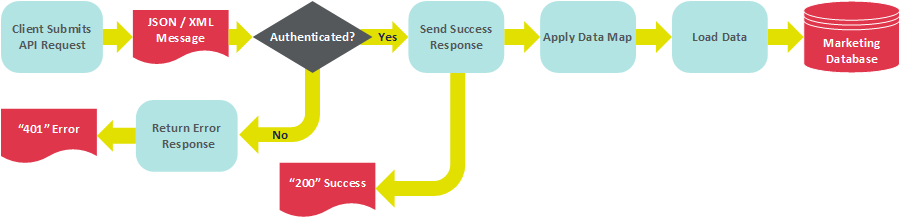
The following diagram depicts the basic processing flow for loading data via the Standard Data Load endpoint.
Pre-requisites
The Standard Data Load endpoint requires the following:
-
Data Map -- The Data Map provides data handling instructions, such as where to store the inbound data contained within the API request message, and whether this data should be used to update existing records and / or create new records.
-
API Post -- The API Post must contain all expected fields in the request message. In addition, the "REST API Only" check box should be checked. You must also publish the API Post to make it available.
POST Method
The Standard Data Load endpoint supports the following POST operation. This endpoint allows you to load a record into your marketing database. The request message must include the following:
-
The Object Reference ID of the API Post.
-
The data to be loaded, sent using Name / Value pairs. For the field names, be sure to use the system Column Name, and not the user-friendly display name.
Click here to see a sample request message in JSON format.
