
Prerequisites - Campaigns
Journeys uses Cheetah Digital Campaigns to send messages to the consumer. Supported message types include Email, SMS, and Push Notifications.
You can create these Campaigns in advance within your Cheetah Digital and reference them in Journeys by entering their Campaign IDs in the relevant Send steps.
For detailed instructions on creating campaigns, see Creating Email, SMS, and Push Notification Campaigns.
Campaigns must be launched before they can be used within a Journey.
Note: When creating your Campaign, make sure to select:
Data Source Table: The same table used in your Journey
Type: Event triggered (can be Simple Event Trigger or Advanced Event Trigger) for real-time Journeys and Scheduled Journeys option for Scheduled Journeys.
Channel: Email, SMS or Mobile Push Notification corresponding to your Send Step
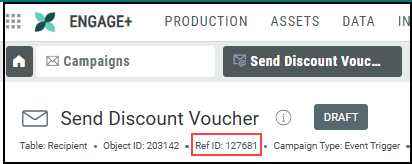
Record your Campaign ID so you can reference it in your Journey.
You can also create a placeholder Campaign directly from within a Journey. This placeholder can later be edited and launched from Cheetah Digital.

