Prerequisites - Customer Data Source
Intended Audience: Technical marketers or expert users who have experience with solution configuration, data management, and advanced setup.
During a Journey, you may want to reference a customer’s personal details to personalize their experience. Using the right data for personalization can significantly influence customer behavior and improve the success of your Journey.
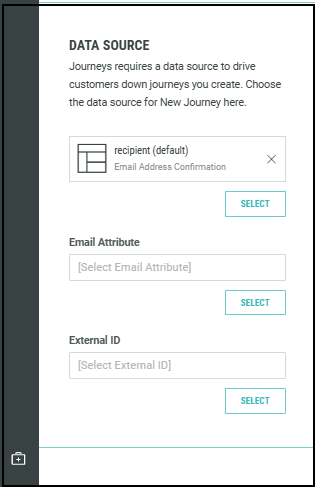
Identify the data table where your customer data is stored. This ensures that Journeys uses the correct data source for campaigns, events, and triggers. Specifying the customer data source in the Journey settings allows unique customers to be identified across multiple table locations.
When Journeys is enabled, a data source table called the primary sending table in Cheetah Digital is automatically set as your default table. This table is used by default for all Journeys. If you need to use a different table for a specific Journey, you can select it in the Journey settings.
Ensure that this table either contains, or is joined to, tables with all the data required for campaign sending, personalization, and event triggers.
Note: If you're unsure which Cheetah Digital database table contains the customer data, contact your Cheetah Digital administrator or Marigold representative for assistance.
Start Steps, Update Steps, Decision Steps, and settings like Journey Target Date rely on customer data stored in your Cheetah Digital table to tailor the Journey for each individual. To enable this, you must specify the Cheetah Digital customer table in the Journey Settings—this ensures that customers are correctly identified across all data locations.
By associating a single table, Journeys can identify the exact table row corresponding to a unique customer. Journeys uses this customer ID (also known as the PKID) to locate the customer within the Journey, communicate with Producer apps to retrieve more details, and trigger the appropriate personalized content. The PKID helps you uniquely identify customers across multiple tables and systems.
You will need this detail to specify in the Data Source field of your Journey settings.