
Understanding: Custom Domains
As part of our ongoing effort to offer more meaningful brand continuity and recognizable Experiences for the end users, custom domains allow to publish Experiences to one or more of their brand domains.
What are custom domains?
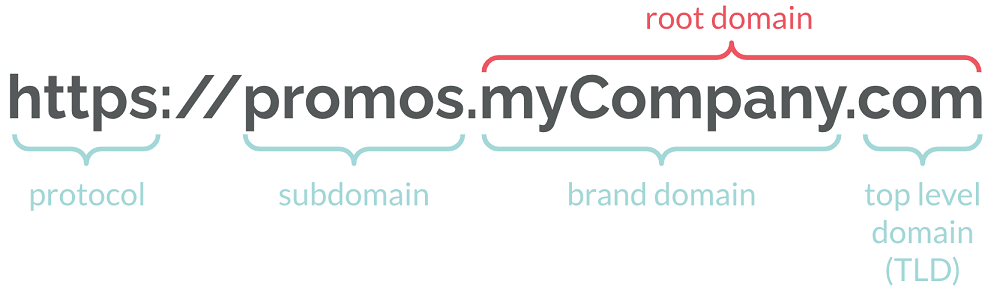
In order to better understand custom domains in Grow, let's quickly review what domains and subdomains are. A web address consists of a domain name (or root domain) like myCompany.com and, optionally, a subdomain.
- A domain name, also known as a primary domain or a root domain – is essentially the name of your website. It is the address that you type into a web browser's address bar to view a website. An example of a domain name is google.com.
- A subdomain is a unique prefix to your business domain and can be used to differentiate different services that your brand offers. For example, to distinguish support services from their main website, Google uses the subdomain support.google.com. This example also illustrates that a subdomain appears before the domain name in a URL. Finally, subdomains can be hosted on separate servers away from your main website.
- A vanity path comes after the domains. It is a custom, easy-to-read URL path that replaces system-generated links with something shorter and more meaningful. Instead of using URLs with random strings or parameters, vanity paths use clear, descriptive words—such as example.com/signup or example.com/summer-sale—to make links more user-friendly.
What are custom domains used for?
Custom domains are useful when you want to provide a trusted brand Experience for your users.
For instance, when you want to run Experiences offering promotions you can use a custom domain like promos.myCompany.com. They are also useful to run seasonal campaigns like Halloween and have them hosted on spooky.myCompany.com allowing you to gear towards a target audience with a specific goal.
Using custom domains to publish campaigns increases awareness of the brand and builds trust.
Fair usage policy & operational costs
You may connect up to 5 custom domains to your account as part of our standard licensing terms. If you'd like us to purchase a domain name on your behalf or you wish to use more than 5 custom domains, additional fees may be incurred. Please contact your CSM for more information.
Ready to use it?
To start using custom domains, follow the instructions outlined in the attached technical guide.
Once configured, please refer to this article to help you publish Experiences to your custom domain(s).
If you need help or have any questions, please reach out to your Customer Success Manager or email global.support@cheetahdigital.com who will be happy to help get you started and run you through the options available.
Attachment
