
Select a Business Unit
Within Zeta, a Business Unit represents a brand or division within the larger Organization. The use of business units is optional. If your Organization utilizes business units, users will be assigned access to one or more business units within one or more applications.
Zeta Login allows you to seamlessly switch between the business units to which you have been granted access. Your currently selected business unit is displayed in the top-right corner of the User Workspace, next to your profile icon.
For more information on how to view the business units to which you have been given access, see View Application and Business Unit Access.
Note: This feature is available for all Roles.
To select a business unit:
-
Log into theZeta Login User Workspace.
-
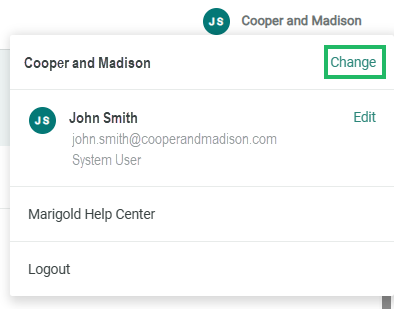
Click your profile icon in the top-right corner of the screen. The Profile Info pop-up window is displayed.
-
Within the Profile Info pop-up window, click Change. The Change Business Unit pop-up window is displayed.
-
The Change Business Unit pop-up window displays all the Business Units to which you have been granted access. Optionally search for a Business Unit by entering all or part of the Business Unit name in the search field.
-
Select the desired business unit.
