Understanding: Enhanced Analytics
A good analytics strategy is a key component of any successful marketing campaign. Marigold Grow surfaces events that can be sent to the analytics provider of your choice so that you can analyze views, engagement, drop-off rates, conversions, and click-throughs and then make real-time adjustments to your Experience in order to maximize your ROI.
How it works
Once you have setup your integration, we will include any necessary third-party scripts and start sending analytics events to that system for all of your Marigold Grow Experiences.
Note: We do not dispatch analytics events for web embeds and ad units. You can learn more about the reasons for this in the attached document.
Events
Several events are available to support your use cases.
A couple of them are:
- form:module:interaction
Surfaced the first time a user interacts with a form field enabling you to measure drop-off rates. - action:cta
Surfaced when a user clicks a CTA enabling you to measure click-through rates.
See the attached document for a full list of events.
Google Analytics
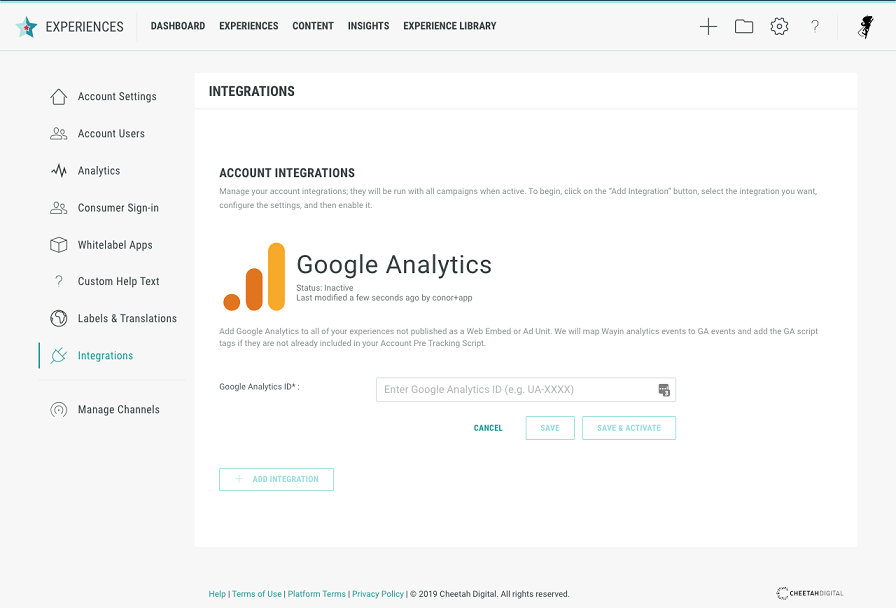
- Navigate to your account integration management area /admin/account/integrations.
- Click the Add Integration button.
- Select Google Analytics from the available options.
- Configure your Google Analytics integration.
- Provide the Google Analytics ID.
- Click Save & Activate.
Google Tag Manager
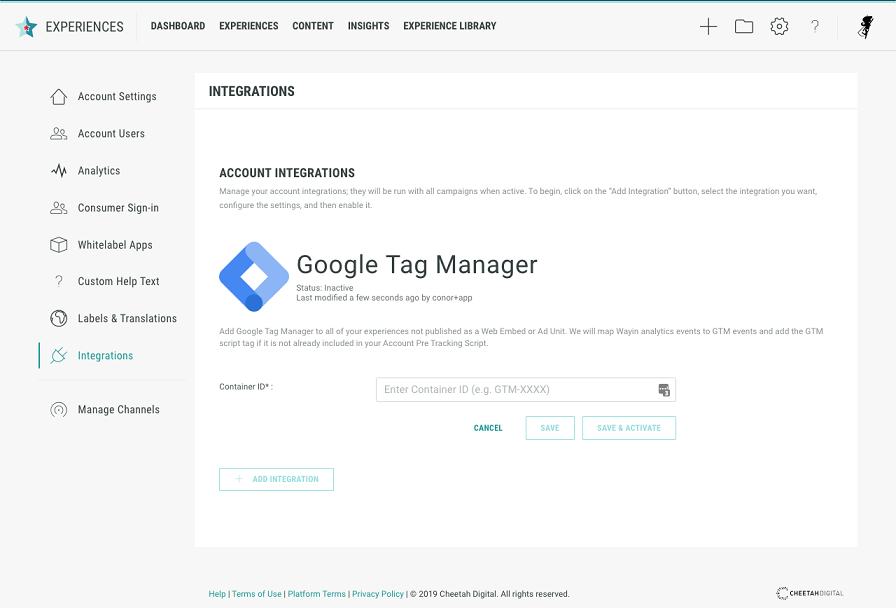
- Navigate to your account integration management area /admin/account/integrations.
- Click the Add Integration button.
- Select Google Tag Manager from the available options.
- Configure your Google Tag Manager integration.
- Provide the Container ID.
- Click Save & Activate.
Attachment