New features in Grow
October 2, 2025
Version 25.20
Please note that all new release notes and new/updated help topics are written in the context of NextGen Experiences.
Pexels image size selector
BACKGROUND:
Until now, images pulled from Pexels were limited to their original size. While this worked well for creating full-screen backgrounds, it often meant that the images were larger than necessary for other use cases. This lack of flexibility made it harder to optimize performance or adapt the images to different formats.
SOLUTION:
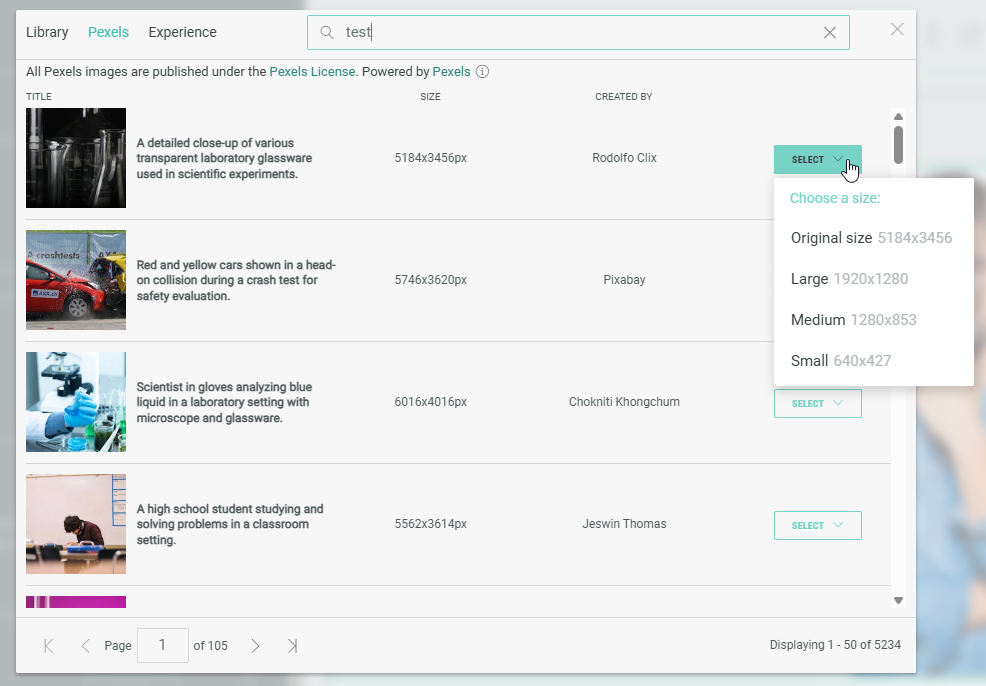
We’ve improved our Pexels integration by adding a size selector. You can now choose the image size you need from a drop-down, giving you more flexibility. Larger images remain available for full-screen backgrounds, while smaller sizes make it easier to use Pexels across different formats.
What this looks like in Grow:
Anywhere in Grow where you can add an image (for example, while building an Experience), you have the option to select an external image from Pexels.
After performing a search, in the list of returned results, each image shows a drop-down from which you can select the image in the desired size.