
Convert Hive Query to Trino
Over the course of 2026, the engine used to execute Queries in Loyalty will change from one that processes Hive syntax, to one that expects Trino query syntax.
The roll out of the Trino Execution Type in Loyalty will be done by region, with Australia and Europe to be completed in calendar Q2. The North America region will follow later. When Trino is enabled, where possible, Trino syntax will be generated automatically for existing Hive queries. For cases where Hive queries include semantics that can not be automatically converted to Trino, your Zeta team will assist with reconfiguring the query using Trino. Queries used to support critical path reporting and export flows are recommended to be tested before transitioning to the Trino syntax.
In order to support the above transition, the platform supports a built-in conversion tool that will convert a Query written using the Hive syntax to the Trino syntax.
To convert a Hive Query to Trino:
-
Select Analytics from the top navigation bar, then select Settings > Queries from the side navigation menu. The Analytics Queries screen is displayed.
-
Optionally, search for and select the desired Query (see
-
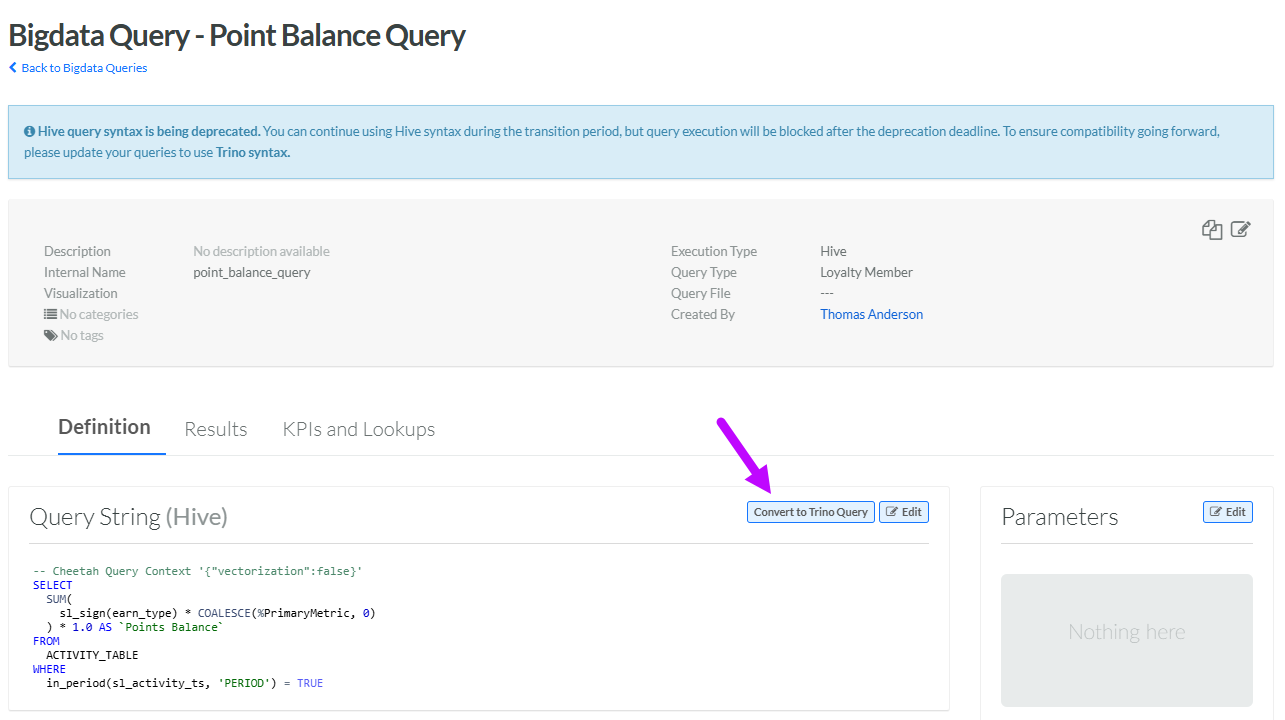
Within the Query String section, click Convert to Trino Query.
Note: The Convert to Trino Query button is displayed only if Hive is the currently selected Execution Type. If you need to change the selected Execution Type, click Edit, select Hive from the Execution Type drop-down menu, then click Save.
-
The platform attempts to convert the Hive query syntax to the Trino syntax. The results are displayed within the Convert to Trino Query pop-up window. Click Close.
-
Optionally, to select Trino as the Execution Type, click Edit, then select Trino from the Execution Type drop-down menu. Click Save.
