

An Award refers to a Reward granted to a Member, without the Member having to deduct any of their Metrics. An Award is essentially a "free" Reward, as opposed to a Redemption, which is a Reward that a Member earns and purchases with the appropriate number of Metrics.
From the Member Profile screen, a Customer Service Representative can grant an Award to a Member.
-
Select Members from the top navigation bar, then select CSR > People from the side navigation menu. The People screen is displayed.
-
On the People screen, search for and select the desired Member (see
-
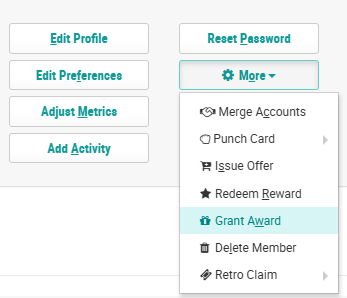
Within the header section of the screen, click More > Grant Award. The Edit Award pop-up window is displayed.
-
From the Reward drop-down menu, select the desired Reward.
-
Optionally, check Auto Claim Upon Award. If checked, the Award will automatically move to a status of Claimed.
-
Optionally, in the Reason text field, enter the reason for granting this Member the Award.
-
Select the desired Effectivity option:
-
Always: The Award is always available and does not expire.
-
Schedule: The Award is available only within a certain date range. Enter the start and end date / times, and select a time zone.
-
-
Click Save.
