
Getting Started With Content Blocks: Footer Content Block
A branded footer Content Block (e.g., plantopia-2-footer) can include several configurable elements to support flexibility and reuse across campaigns.
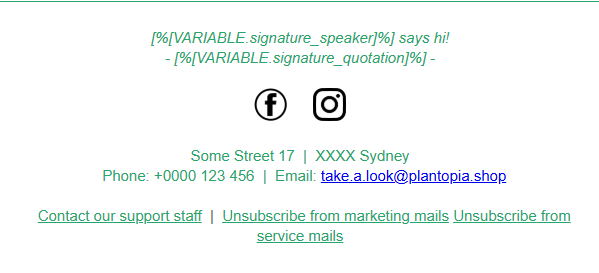
Optional signature block
A boolean variable can be used to toggle the visibility of a signature section:
<sg:var id="show_signature" name="show_signature" type="boolean" value="false" />When enabled, the signature will be displayed; when disabled, it remains hidden.
Signature name selector
A text variable with selectable options allows the marketer to choose the name displayed in the signature block:
<sg:var name="signature_speaker" type="text" value="Pamela Isley">
    <sg:option value="Alex Holland">Alec</sg:option>
    <sg:option value="Pamela Isley">Pam</sg:option>
</sg:var>
Signature quote
A text variable can be used to define a quote shown beneath the signature, with default copy provided:
<sg:var id="signature_quotation" name="signature_quotation" type="text" value="A beautiful plant is like having a friend around the house." />Note: Because signature_quotation uses sg:var, the text is fixed and not automatically translated.
- For localization, consider using: sg:text or sg:content components, or
- A dictionary-based solution with pre-translated quote options.
Social media icons
A boolean variable controls whether social media icons are displayed:
<sg:var id="show_social_icons" name="show_social_icons" type="boolean" value="true" />Social media links
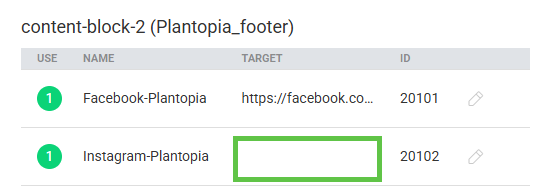
Links to social platforms can be defined as follows (note that one link below is intentionally incomplete):
<a data-link="Facebook-Plantopia" href="https://facebook.com/plantopia">
<a data-link="Instagram-Plantopia" href="">
In the email editor, both links will display their data-link names. However, links with empty href attributes must be completed by the marketer before sending.
Marketing vs Service email selector
A selector variable can be used to distinguish between Marketing and Service emails. This determines which unsubscribe logic is applied:
<sg:var name="communication_type" type="text" value="Mkt">
    <sg:option value="Mkt">Marketing</sg:option>
    <sg:option value="Svc">Service</sg:option>
</sg:var>
Unsubscribe logic
The unsubscribe link can be conditionally displayed based on the selected communication type:
<sg:conditional id="unsubscribe_marketing" expression="all(eq([VARIABLE.communication_type], 'Mkt'))">
<a style="color: #26a66b; font-weight: 400;"
href="sgmc://journey/1234/1?CAMPAIGN=[%journey('name')%]&CAT=Marketing" data-
link="unsubscribe_marketing" unsubscribe-link="true">
Unsubscribe from marketing mails</a>
</sg:conditional>
Important Considerations
- The unsubscribe link redirects contacts to a dedicated unsubscribe journey.
- This unsubscribe journey must already exist before configuring the URL in this format.
- Links within the Content Block include the attribute unsubscribe-link="true", which ensures proper unsubscribe tracking and compliance handling.
For more information about the unsubscribe-link attribute, refer to the dedicated documentation section.
