
What's New in Sailthru by Zeta
Saved Rows in Overlays
Background:
Building overlays often repeats the same rows (titles, forms, footers). Saved Rows remove that repetition. This feature has been popular in Visual Templates and Visual Hosted Pages, and we are pleased to offer it in Overlays.
Solution:
Save any row once, then drag it into future overlays. After insertion, edit it freely. Changes apply to the current overlay only, not the Saved Row itself.
What this looks like in Sailthru:
- Accessible in Sailthru by going to Messaging > Onsite > Overlays and editing or creating a Visual Overlay.
- Create: Select a row, click the save icon, name it and press Create Saved Row.
- Use: Rows tab, select Saved Rows, drag to canvas then edit locally as required.
For more information, see the Overlays Visual Composer documentation.
Message Frequency Capping
Background:
Subscribers can become overwhelmed due to the volume of messages they are receiving. To maintain sender reputation, keep customers engaged, and reduce unsubscribes, marketers need an efficient way to manage marketing message volume.
Solution:
With Message Frequency Capping, protecting your brand reputation and mitigating unsubscribes couldn’t be easier.
Marketing messages can be capped by channel and label, but can also be excluded from capping, ensuring critical marketing messages always reach their audience. Transactional and test messages are unaffected by Message Frequency Capping.
What this looks like in Sailthru:
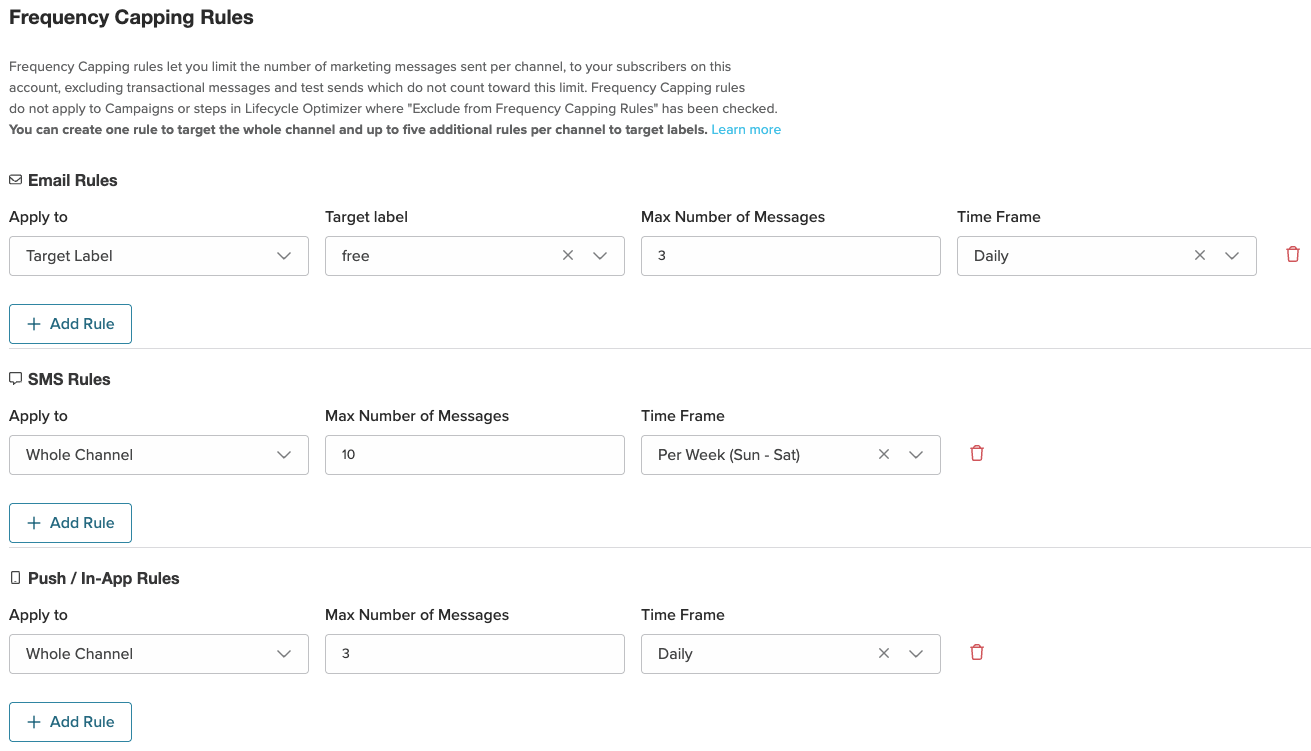
For more information, see the Message Frequency Capping documentation.