Introduction
Introduction
Brands will win in the market on differentiated journeys, winning against their competitors and winning loyalty from their customers. Interactive Moments will power your journeys with real-time data on your customers’ behavior. That data is then activated in real-time.
Interactive Moments is a service on the Zeta Global platform that listens for signals of customer behavior such as adding items to a cart, clearing the cart or removing items again. It defines moments in real time, such as the point at which a customer is considered to have abandoned their shopping cart.
The difference with a moment is that it has rules, it is not simply a recorded customer behavior or signal. In this example, a cart is defined as being abandoned when it has contained items for a specified length of time, but no purchase has been made. It is a moment because it is a set of rules.
Automated actions upon occurrence of a moment or signal is what makes the service interactive. For an abandoned cart moment, the desired customer outcome is that they make a purchase. The automated action could be sending a message to the customer, reminding them to check out, increasing the likelihood of a purchase.
For inspiration on use cases by vertical market click here.
The actions triggered by the occurrence of a moment or signal are configured via a Journey ( Cheetah Digital for now, other messaging solutions will be added in the future), so setting up for success with Interactive Moments requires a number of steps as outlined below.
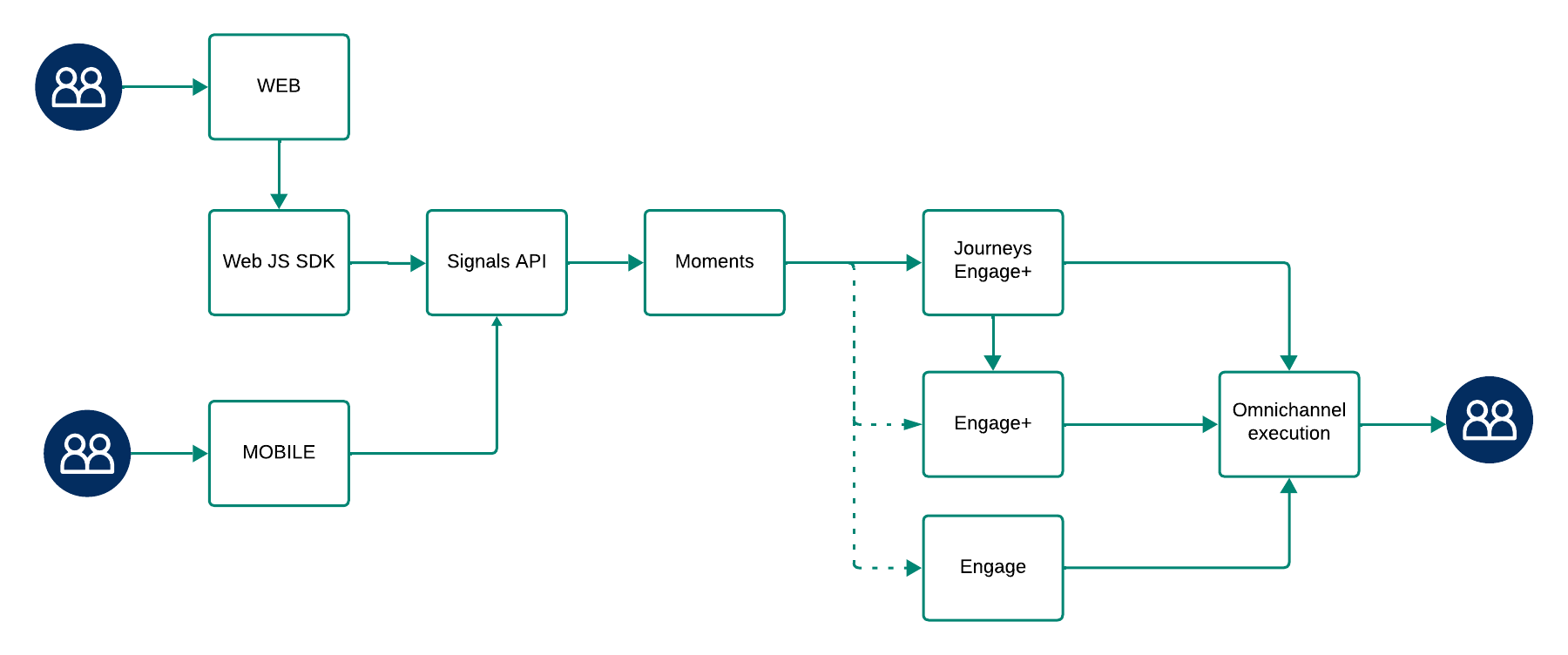
As you can see, Interactive Moments is only one element of the solution and can not be used stand-alone. It is used in combination with a messaging tool. Journeys are required that capture the Moment and react upon it by sending out a communication. Also, set up is required on the side of the source of the signal, such as the customer's website or mobile app, to be able to track events and communicate these.
Audience configuration
If you manage multiple websites, you may want to track signals from just one specific site. In some cases, different websites trigger different actions and require tailored signal handling. You can manage this in the Audience Configuration section of the application. Here, you define which domains to observe and which audience to associate with incoming signals.
Also, the unique keys to be able to communicate with the signals API are defined here.
For mobile apps, an audience configuration is still required. It contains the necessary server key information used to identify which app-based signals should be tracked. No domains need to be defined.
If you’re using both a website and a mobile app, you can configure them as separate touch points, or combine them under a shared Audience Configuration. This helps maintain consistency in how signals are tracked and interpreted across different sources.
Read more about this in the topic Audience configuration.
Listening for signals
Next, the Interactive Moments service must observe the customer behavior and listen to signals of these events. This means known customers, for example someone logged into the website.
Note: Interactive Moments currently only supports known contacts, requiring the email address or custom ID of the visitor to be known and exist in the database, e.g. the Messaging database, such as Cheetah Digital.
1. When a visitor signs in, all subsequent events are sent as signals to the Signals API and are linked to their profile using their email address or custom ID.
2. If a visitor was previously signed in but has now signed out, all events within the same session continue to be sent as signals to the Signals API and remain linked to their profile.
3. If an anonymous user visits the website without signing in (and thus without a known email address or custom id), no signals will be sent to the Signals API. However, once the visitor signs in, events from that point onward will be sent as signals and linked to their profile.
Signals captured from the website, can be sent to the Signals API in multiple ways:
-
Using the SDK (or GTM for easy tagging of the pages). Read more about the SDK and GTM.
-
Using the API. Read more about how to use the API.
Signals captured from a mobile app can be sent to the Signals API using the API.
There are a wide range of signals that can be captured and sent via the Signals API, covering different use cases. For a full list of signals, check the Signals Overview topic.
Engagement profiles
When signals are captured, they are sent to the Interactive Moments platform via the API. This is called the event stream. It results in the automatic creation of an Engagement profile that can be used for targeting and personalization. Such a profile typically contains data on recency, frequency, intensity, recent intensity, and momentum to provide a comprehensive view of customer engagement.
You can find more details on this in the Engagement profile topic.
Configuring Moments
The signals sent via the API can then be used to define the rules for the Moments. For example, only consider a basket as abandoned when at least 4 hours have passed since adding items to the cart. An overview of all available Moments can be found here.
You can also find more details on how to configure these Moments in the Create Moment topic.
Configuring journeys
Signals and Moments are then available to use in a Journey. Brands will win on differentiated journeys, winning against their competitors and winning loyalty from their customers.
If Cheetah Digital is your messaging solution:
-
Click here to for an introduction to Journeys and golden rules for building successful journeys.
-
Click here for how to update an existing Journey to use a Moment
-
Click here for an overview of the use cases supported for Cheetah Digital and full end to end set up.